
The 80-Hour Grade Nobody Budgeted For
A DP shoots an indie feature in LOG without a show LUT. On set, the monitor displays the raw LOG image: flat, gray, low contrast. The director asks if the scene looks right, and the DP says it will look good after the grade. They shoot 24 days this way.
In post, the colorist opens the footage and finds no look to grade toward. Every scene starts from a blank canvas. What should have been a 40-hour grade becomes 80 hours, because establishing the look shot by shot is slower than refining an established look. At $100 per hour, the missing LUT cost $4,000.
A show LUT (look-up table) is a pre-production color decision that converts your camera's LOG signal into the image you intend the film to look like. This post covers what a LUT actually does to your image data, how to build one in about 4 hours, and the monitoring and post workflow it unlocks.
The conventions here follow the monitoring and show LUT workflows documented by the Colorist Society International and the color management pipeline in DaVinci Resolve. Resolve is at version 21.2 as of November 2026, and the free edition exports LUTs.
What a LUT Actually Does to Your Image
A LUT is a file that remaps color values. Your camera records LOG: a flat encoding that preserves highlight and shadow detail but looks washed out on a normal display. A LUT translates those flat values into a display-ready image with the contrast, saturation, and color balance you choose.
Two properties matter for production work. First, camera LUTs are 3D LUTs: they remap every RGB value through a three-dimensional color cube, which lets them change hue and saturation relationships, not just brightness. Second, the file standard is .cube, an interchange format every grading and monitoring tool reads. Monitors load 17-point or 33-point cubes; a 33-point file is the safe export for on-set work.
Four LUT types get confused constantly. A technical LUT converts the camera's LOG to a standard color space like Rec.709, and the camera manufacturer publishes it. A creative LUT is a look built on top of that transform. A show LUT is the creative LUT the production commits to: created in pre-production, monitored on set, delivered to the colorist as the reference. A monitor LUT is whatever the on-set display applies so the crew watches the graded image instead of flat LOG.
The money argument is arithmetic. Without a show LUT, a colorist on an indie feature estimates the look fresh for every scene: call it 80 hours on a typical feature at $100 per hour, or $8,000. With a show LUT delivered as reference, the grade becomes shot-level refinement of an established look: 40 hours, or $4,000. A 4-hour LUT creation session with the colorist costs $400. Net savings: $3,600, plus a director who watched the actual film on set instead of a gray guess.
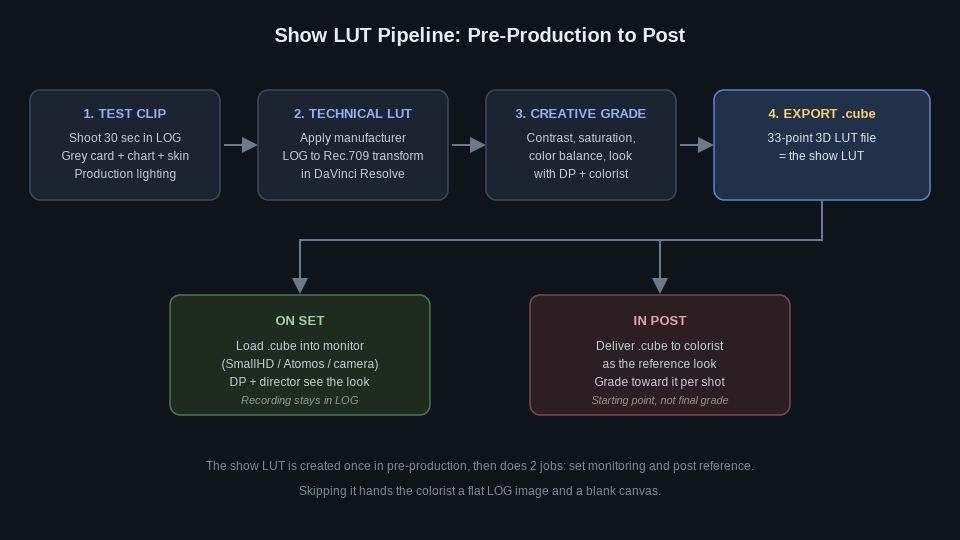
One limit worth naming before the steps: a LUT is a monitoring and reference tool, not a grade. The recording stays in LOG, the LUT lives in the monitor, and the colorist still adjusts every shot on top of it. Productions that bake a LUT into the recorded image throw away the flexibility LOG exists for, which is exactly the failure covered in the set-to-colorist handoff guide.
Three Real-World Scenarios
Scenario 1: LOG Monitoring Only, No LUT
A DP shoots a 22-day feature on a Sony FX3 in S-Log3, monitoring the flat image. The director cannot evaluate skin tones or contrast and approves scenes she cannot actually judge. In post, the colorist builds the look from scratch: 80 hours at $100 per hour, $8,000. The director also discovers in the grade that 2 night scenes were underexposed, a problem the flat monitor image hid on set.
Scenario 2: Show LUT Built in Pre-Production
A DP and colorist spend 4 hours before a 24-day shoot on an ARRI ALEXA 35. They shoot a test clip in LogC4 with a grey card, an X-Rite ColorChecker, and the lead actor under the production's tungsten-balanced lighting. From that clip they build a warm, slightly desaturated show LUT in Resolve and export it as a 33-point .cube. On set, the SmallHD monitors display the look; the recording stays LogC4. The colorist grades toward the reference: 40 hours, $4,000, plus the $400 session. Total $4,400 against $8,000, and the director approved lighting and wardrobe against the real look all shoot.
Scenario 3: Technical LUT Only, No Creative Look
A production applies only the manufacturer's LOG-to-Rec.709 transform on set. The director sees a correct but neutral image and makes reasonable exposure calls. In post, though, the colorist still has no creative target, so the grade takes 60 hours, $6,000. The technical LUT saved $2,000 over no LUT, and cost $2,000 more than a show LUT because nobody established the creative look before the shoot.
LUT Approaches Compared
The table below compares the 4 ways productions handle camera LUTs, from no LUT at all to a show LUT built with the colorist who will finish the film. The last row is the one that pays for itself.
| Approach | On-set image | Director can judge | Colorist starts from | Grading time | LUT cost | Total post cost |
|---|---|---|---|---|---|---|
| No LUT (LOG monitoring) | Flat, gray, low contrast | No, guesses at the look | Blank canvas, every scene | 80 hrs | $0 | $8,000 |
| Technical LUT only | Correct Rec.709, neutral | Yes, but no creative look | Neutral transform | 60 hrs | $0 (manufacturer) | $6,000 |
| Show LUT (built in pre-pro) | The intended look | Yes, the real look | Established reference | 40 hrs | $400 session | $4,400 |
| Show LUT baked into recording | The intended look | Yes | Nothing left to grade with | 40 hrs | $400 session | $4,400 plus lost flexibility |
The difference between the last 2 rows is invisible on the budget line but decisive in the grade. Monitoring with the LUT while recording LOG gives you the same on-set image and keeps all the data. Baking it in gives you the same image and throws the data away.
How to Build a Show LUT, Step by Step
- Book a LUT session with the colorist who will grade the film. Budget 4 hours at the colorist's rate with the DP present. Do this during pre-production, ideally after the lighting and wardrobe approach is decided, because the LUT should be built under representative conditions.
- Shoot the test clip in the camera's LOG format. Put an 18% grey card, an X-Rite ColorChecker (about $150), and a subject with real skin tones in frame. Light it with the production's lighting setup and record 30 seconds.
- Bring the clip into DaVinci Resolve. The free edition of Resolve 21 does everything this workflow needs, including .cube export.
- Apply the manufacturer's technical transform. Use the official LOG-to-Rec.709 LUT for your camera family: ARRI LogC4, Sony S-Log3, Canon C-Log3, RED Log3G10, or Blackmagic Gen 5 or Gen 6 color science. This is the floor the creative grade sits on.
- Grade the look. With the DP and director, set contrast, saturation, color balance, and the creative intent: warm, cool, film emulation, whatever the film is. Keep it conservative enough to work on every scene, not just this shot.
- Export as a 33-point .cube. That is the show LUT. Name it and version it: showLUT_v1.cube is a file you will reference in post a year later.
- Load the LUT into every on-set monitor. SmallHD and Atomos monitors take .cube files from an SD card. Many cameras also accept a look file for the viewfinder and video output while recording LOG. Verify the color temperature of your lighting matches what the LUT was built under, or skin tones will drift.
- Confirm exposure against the grey card. The exposure calculator keeps the LOG signal at the level the LUT expects. A LUT built on well-exposed LOG applied to underexposed footage produces clipped, noisy shadows on the monitor.
- Preview the LUT on test footage. Run the .cube through the LUT Previewer on clips from camera tests so every department sees what the LUT does before day 1.
- Deliver the .cube to the colorist with the camera reports. The colorist grades toward it, shot by shot, on top of the reference rather than from a blank canvas.
Pro Tips and Common Mistakes
Pro Tip 1: Build the LUT with the colorist who will grade the film, not a different one. A LUT built by someone else encodes a look that may fight the finishing colorist's workflow. The person who grades toward the reference should help create it.
Pro Tip 2: Always shoot the grey card and the color chart in the test clip. Without them, the LUT is tuned by eye on 1 display in 1 room. The chart gives you measured references for skin tones and primaries that survive from the LUT session to the grade.
Pro Tip 3: Load the same LUT onto every monitor on set: DP, director, script supervisor, video village. Mixed monitoring, where the DP sees the look and the director sees flat LOG, produces arguments about exposure that do not exist.
Pro Tip 4: Build the LUT slightly conservative. A show LUT tuned for one hero scene can clip skies or crush interiors on other setups. Grade for the average scene, not the best-looking frame of the day.
Common Mistake 1: Baking the LUT into the recorded image. The mistake: recording with the LUT applied so the file on the card looks finished. The fix: record LOG, monitor with the LUT. A baked-in look cannot be ungraded, and it discards the highlight and shadow detail LOG exists to preserve.
Common Mistake 2: Building the LUT without the final colorist. The mistake: a DP or editor makes a look alone and hands it to a colorist in post. The fix: involve the finishing colorist at creation, or expect them to undo and rebuild the look anyway.
Common Mistake 3: Treating the LUT as the final grade. The mistake: assuming the show LUT on set is what the delivered film will look like. The fix: the LUT is the target, and the colorist still adjusts exposure, matching, and secondaries on every shot.
Frequently Asked Questions
What is a LUT in film production?
A LUT is a file that remaps color values from one color space to another, most often from a camera's flat LOG encoding into a display-ready Rec.709 image. A show LUT is the creative version a production builds in pre-production. It defines contrast, saturation, and color balance, so the crew monitors the intended look on set and the colorist has a grading reference in post.
Should I create a LUT before the shoot?
Yes, whenever you are recording LOG on anything longer than a test. A show LUT typically halves grading hours because the colorist refines an established look instead of inventing one. It also lets the director and DP evaluate the real image on set instead of guessing at flat LOG. The cost is a single 4-hour session.
How do I make a LUT for my camera?
Shoot a test clip in LOG containing a grey card, a color chart, and skin tones under your production lighting. In DaVinci Resolve, apply the camera manufacturer's LOG-to-Rec.709 transform, grade the creative look on top, and export as a 33-point .cube file. Load that file into your monitors and deliver it to the colorist.
How much does it cost to create a show LUT?
The session is the cost: roughly 4 hours of the colorist's rate, or about $400 at $100 per hour. Software is free if you use Resolve, and the color chart is a one-time purchase of about $150. Against the $3,600 a show LUT typically saves on a feature-length grade, the session pays for itself several times over.
Can I use a LUT on set without one in post?
You can, and many productions do exactly that: monitor with the LUT so everyone sees the intended image, then let the colorist grade from LOG in post. It is still better to deliver the LUT as a reference, because the look the director approved on set is the look the colorist should be grading toward.
Related Tools and Reading
The Color Temperature Calculator confirms your lighting matches the temperature the LUT was built under, and the LUT Previewer applies your .cube to test clips before the shoot. The exposure calculator keeps the LOG signal at the level the LUT was tuned for. On the wider workflow, the LOG workflow guide covers what LOG costs you in storage and post. The set-to-colorist handoff covers the monitoring-LUT-vs-baked-LUT mistake in depth, and the indie lighting guide is the lighting setup the test clip should be shot under.
Decide the Look Before the Camera Rolls
A show LUT is a pre-production color decision. Build it with the finishing colorist, shoot the chart and grey card, load it on every monitor, and deliver it as the grading reference. On a feature-length grade it typically cuts post hours in half and saves $3,000 to $4,000.
One honest limit: the LUT is a starting point, not the grade. It gets everyone looking at the same image. The colorist still finishes the film shot by shot.
What color decision did you leave to post that a pre-production LUT would have settled, and what did it end up costing in grading hours?


